Why HubSpot CAPTCHA still misses some form spam paths
HubSpot CAPTCHA helps, but spam can still appear through old form GUIDs, non-HubSpot paths, and low-signal submissions.
You enabled HubSpot CAPTCHA or spam protection. The form still looks exposed. Spam still shows up somewhere in the form workflow. The tempting conclusion is "reCAPTCHA does not work."
That is too broad. HubSpot's native protection does work for many teams, and it is worth turning on when it fits your form path. The more useful question is narrower: which submission paths does CAPTCHA cover, and which paths can still create operational noise?
This matters because HubSpot form spam is not one path. It can arrive through a visible embedded form, an old form GUID that is still active, a non-HubSpot form captured on a tracked page, or a direct POST to a known submission endpoint. Those paths have different defenses.
What HubSpot CAPTCHA actually covers
HubSpot's own documentation says HubSpot forms use Google's invisible reCAPTCHA v2. If Google considers the visitor suspicious, the visitor has to solve a challenge before the form submits.
The same page has the caveat that matters for technical buyers: if CAPTCHA is turned on for a form, submissions from the Submit data for a form API or other form integrations are not accepted.
That caveat cuts both ways.
If a bot tries to submit into a CAPTCHA-on HubSpot form through the official submission API, HubSpot can reject it. That is good.
If your setup depends on server-side forwarding into that same HubSpot form, CAPTCHA can also block your own integration. In FormAegis setup, the destination form must be a no-CAPTCHA hidden form because FormAegis scores the submission first, then forwards clean submissions server-side. The protection is moved in front of HubSpot instead of relying on HubSpot's page-level challenge.
So the problem is not "HubSpot CAPTCHA is broken." The problem is that CAPTCHA is one control in a larger ingestion map.
Why spam can still show up
There are four common reasons a team can still feel like CAPTCHA missed something.
1. An older no-CAPTCHA form GUID is still alive
HubSpot forms have public identifiers. Once a bot learns a portal ID and form GUID from an old embed, cached page, copied source, or logs, it can keep posting to that form as long as the form accepts submissions.
The direct-submit endpoint shape is public in HubSpot's developer docs:
POST https://api.hsforms.com/submissions/v3/integration/secure/submit/{portalId}/{formGuid}
That does not mean every direct POST will succeed. CAPTCHA-on forms and HubSpot spam rules can still reject or quarantine traffic. But it does mean a visible page challenge is not the only thing to audit. If the old form is still active, the bot does not have to load your current page to attempt a submission.
2. The submission went to HubSpot's spam submissions view
HubSpot's spam protection is not always a "nothing happened" experience. HubSpot separates detected spam into a spam submissions index, where operators can review, release, or delete it.
That is the correct behavior for many cases. HubSpot's docs say spam-marked submissions do not create or update CRM records, do not trigger form automation, and are deleted after 90 days if not released.
But it can still create daily work. If a Marketing Ops person expects CAPTCHA to prevent the submission from appearing anywhere, a growing spam submissions view still feels like failure. The CRM may be protected, but the operator still has a queue to clear.
3. Non-HubSpot and captured form paths behave differently
HubSpot distinguishes normal HubSpot forms from captured forms. In the Forms API guide, hubspot forms are created and managed as HubSpot forms, while captured forms correspond to HTML forms on external websites when the non-HubSpot forms tool is enabled.
Those paths are useful, but they expand the audit surface. A team might say "our HubSpot form has CAPTCHA" while a different external form or collected path is still feeding HubSpot. In that case, tightening the visible HubSpot form will not explain all spam.
4. Some spam is low-signal or human-assisted
CAPTCHA is best at proving something about the browser interaction. It is not a full lead-quality system.
A real person, a CAPTCHA-solving service, or a bot with a normal-looking browser can still submit low-quality content. HubSpot also documents several spam indicators beyond CAPTCHA: URL in the name field, HTML in the name field, unregistered site domain, gibberish detection on eligible plans, excluded IP or referrer sources, and blocklisted email addresses.
That is why a good response is usually layered:
- Turn on the native controls that fit the form.
- Audit every still-active form GUID and external form path.
- Decide which suspicious submissions should be blocked, quarantined, or allowed through.
Where FormAegis fits
FormAegis is not a replacement for HubSpot. It is a small firewall layer in front of a HubSpot form path.
The setup pattern is:
- A public form submits to FormAegis.
- FormAegis scores the submitted fields, referrer, user agent, honeypot state, and blocklists.
- Clean submissions are forwarded to a hidden HubSpot destination form.
- Risky submissions are held in FormAegis quarantine before they can create CRM noise.
That is why our beta setup is deliberately narrow: Forms scope only. No Contacts API scope. FormAegis needs enough HubSpot access to read a form structure and create the hidden destination form during assisted setup. It does not need to read or sync your existing contacts.
The first rules are intentionally boring because boring rules are explainable:
| Signal | Current FormAegis action | Why it matters |
|---|---|---|
| URL in first or last name | Quarantine | Common bot pattern, and one HubSpot also documents as a spam type. |
| Blocklisted email domain | Block | Useful when a campaign is cycling through the same disposable or known-bad domain. |
| HTML or script in fields | Block | High-confidence exploit or bot signal. |
| Hidden honeypot filled | Quarantine | Real visitors should not see or fill that field. |
| Suspicious user agent | Quarantine when combined with enough score | A curl or crawler user agent is weak alone, but helpful with field-level signals. |
The key difference is control. Native HubSpot protection decides inside HubSpot. FormAegis decides before HubSpot, then gives the operator a release or delete workflow.
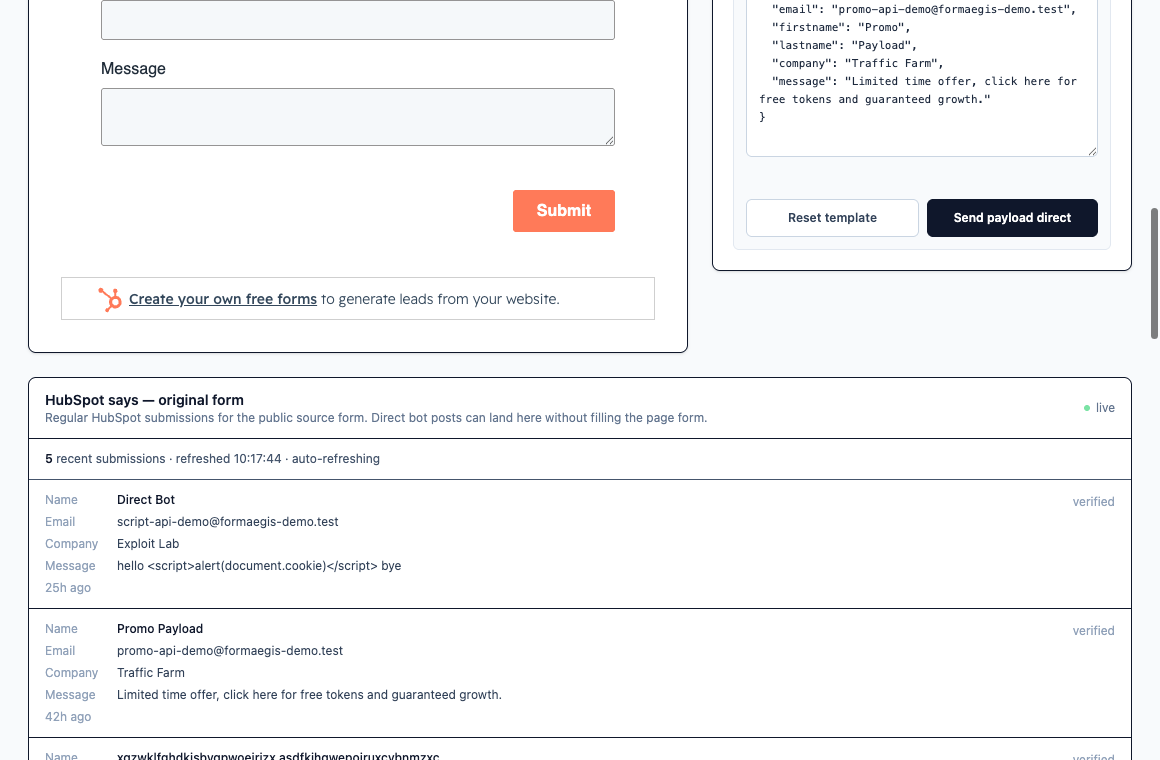
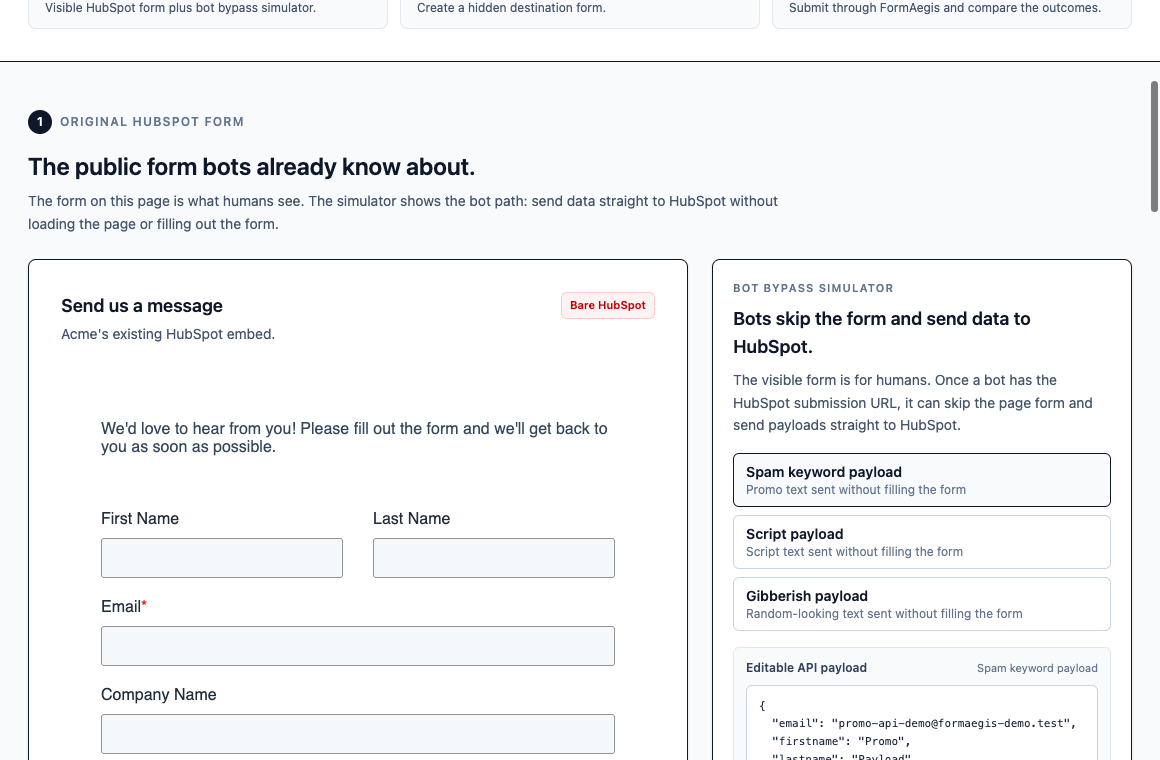
In the public demo, the right panel sends a payload without filling the visible form. The lower panel shows recent submissions on the original HubSpot form. That screenshot is not a universal claim that every bot post bypasses every HubSpot defense. In fact, when we tested it ourselves, most of HubSpot's spam signals held on the direct-submit path — the table below shows which ones held and which ones did not. The point is narrower: a few signals do not apply on that path, so it is worth auditing the active no-CAPTCHA paths bots may already know.
What we found testing the direct-submit path ourselves
The section above is documentation reading. To see how much of it holds in practice, we ran a small exposure test on our own disposable HubSpot portal — not a customer's — using a no-CAPTCHA form we control.
The test is deliberately from the defender's side. We took HubSpot's own list of spam signals and, for each one, sent a submission straight to the public form submission endpoint (the same api.hsforms.com/submissions/v3/integration/submit/... shape shown earlier) instead of through the page's iframe. Then we checked which submissions reached the form's regular submissions inbox and which were filtered out. We are describing categories and outcomes, not publishing a copy-paste attack recipe.
Here is what each documented signal did when the submission skipped the iframe and posted directly to the endpoint:
| HubSpot spam signal | On the direct-submit path | Notes |
|---|---|---|
| Gibberish content | Did not apply — submission landed in the regular inbox | Appears to be a browser/iframe-layer heuristic |
| Malicious script in a field | Did not apply — submission landed in the regular inbox | Same pattern: content-shape check that the direct post skips |
| URL in name field | Held — submission was filtered before the regular inbox | Inspects the actual field value, so it applies on the API path |
| HTML in name field | Held — filtered | Same value-inspection behavior |
| Unregistered site domain | Held — filtered (retested 2026-07-14 with a real, untracked domain) | An earlier run using a reserved test domain looked like a bypass; a proper retest showed the signal does apply |
| Excluded source (IP / referrer) | Not validly tested | HubSpot keys this on IP/referrer, not user agent; needs a follow-up test |
| Blocklisted email address | Not tested | Depends on the specific portal's blocklist |
| Filtered by reCAPTCHA | Not applicable here | Our test form had no reCAPTCHA; this is the one HubSpot's docs already say blocks API submissions |
Read honestly, this is not "HubSpot's spam protection is broken." Of the signals we could validly test on the direct-submit path, most held. Two did not: the gibberish and malicious-script checks, which look like content-shape heuristics that run in the page/iframe layer. A script that never loads the iframe never triggers them, so those two submissions arrived as ordinary-looking leads in the regular inbox.
Two caveats keep this accurate. First, "filtered" here means the submission did not reach the regular inbox — we did not separate "quarantined in the spam view" from "silently dropped," and both are fine outcomes for the operator. Second, two signals (excluded source and blocklisted email) were not validly tested, so this is not a claim about all eight categories.
The reason this matters for FormAegis is narrow and specific: the cheapest, most common bot pattern is a direct POST that skips the iframe, and that is exactly the path where a couple of HubSpot's content heuristics do not run. A layer that scores every submission at its own endpoint before forwarding closes that specific gap, regardless of which iframe-layer checks the bot skipped.
Frequently asked questions
Does turning on HubSpot CAPTCHA stop direct API submissions?
Yes, for that form. HubSpot's docs state that when CAPTCHA is enabled on a form, submissions through the form submission API are not accepted, and our test confirmed a FORM_HAS_RECAPTCHA_ENABLED rejection. The gap is with no-CAPTCHA forms — including old form GUIDs and hidden destination forms — that still accept direct submissions.
If most spam signals held on the direct path, why is there still a problem?
Because the two that did not hold are content-quality checks (gibberish and script-in-field), and because CAPTCHA-off forms and stale form GUIDs remain reachable. A submission that avoids URL-in-name, HTML-in-name, and an untracked page domain can still arrive as a normal-looking lead through a direct post.
Do these results mean HubSpot's spam view is unnecessary?
No. HubSpot's spam submissions view still isolates a large share of detected spam and keeps it out of the CRM. The finding is about one specific path — direct posts that skip the iframe — not about HubSpot's protection as a whole.
What was actually retested on 2026-07-14?
The "unregistered site domain" signal. An earlier run used a reserved test domain and looked like a bypass. Re-running with a plausible real domain that the portal does not track — alongside a repeat of the earlier case and a clean control that did land — showed the signal does apply on the direct-submit path. It is filtered, not bypassed.
A practical audit before adding another tool
Before buying anything, map the ingestion paths.
Start with HubSpot:
- Open Marketing > Forms and sort for forms with recent submissions.
- Add or inspect the Spam Submissions column.
- For each spam-hit form, confirm whether CAPTCHA is on.
- Check whether the spam type is URL in Name Field, Filtered by reCAPTCHA, Unregistered Site Domain, Gibberish, Blocklisted Email Address, or something else.
- Review blocked email domains and free-provider settings on the form.
Then inspect the site:
- Search the public site source for old HubSpot embeds.
- Check WordPress, Webflow, landing page builders, and old campaign pages.
- Confirm whether non-HubSpot forms are enabled and which domains are tracked.
- Retire old embeds only after checking workflows, reports, automations, and integrations that depend on the old form ID.
Finally, decide where you need control:
- If the spam is already isolated by HubSpot and the queue is manageable, native protection may be enough.
- If real leads are getting mixed with spam and operators need review control before CRM creation, add a quarantine layer.
- If bots are hitting old public GUIDs, do the hardening work: remove old embeds, retire form IDs when safe, and stop treating page-level CAPTCHA as the only boundary.
The bottom line
HubSpot CAPTCHA is useful, but it is not the entire form-spam model. It protects a specific kind of visible form interaction. HubSpot's spam submissions view protects CRM records for many detected cases. Neither one automatically explains old no-CAPTCHA GUIDs, non-HubSpot capture paths, or the operator workflow after spam is detected.
If you are still getting spam with reCAPTCHA, do not start by adding a louder challenge to the page. Start by drawing the path the submission actually took.
That path tells you whether the fix is native HubSpot configuration, form cleanup, tracked-domain cleanup, or a firewall layer before the CRM.
Live comparison
Compare the bare HubSpot path with the protected path
The live demo shows a public HubSpot form, a direct-submit bot panel, and the FormAegis layer that scores traffic before HubSpot sees it. Forms scope only. No Contacts API scope.
See it live